

Your shopping cart is empty!
 Call us: +1-(437)-290-7537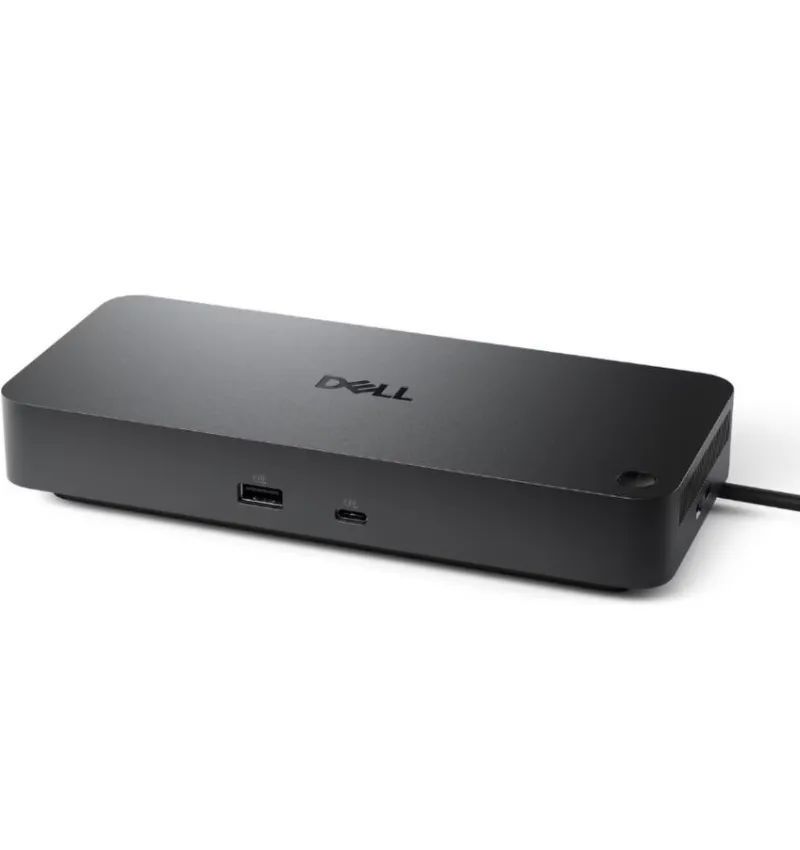
Dell Pro Dock WD25Z USB-C Docking Station (DELL-WD25Z) | New
Condition: New
Availability: In Stock
Availability: In Stock
| Delivery Option | |
| Anywhere | |
|
Express Delivery in USA Get within 1 to 3 days |
|
|
Free Ground in USA 2 to 6 days (Varies by location) |
|
|
International Delivery Must have a UPS FedEx or DHL account to ship on or a USA based Freight Forwarder to Ship To. |
|
| Visa, Mastercard, AMEX,PayPal,Wire are accepted | |
| PO accepted from Qualified Institutions | |
| Only Wire Transfer accepted For International Customers |
|
| Return & Warranty | |
| 90 days return | |
| Warranty vary by product Please see our policies page. |
|
Overview of Dell Pro Dock WD25Z USB-C Docking Station (DELL-WD25Z) | New
The Dell Pro Dock WD25Z USB-C Docking Station (DELL-WD25Z) is designed to use a single cable to transform contemporary USB-C laptops into complete desktop workstations. It minimizes cable clutter while providing power, wired networking, high-resolution multi-monitor capability and a wide variety of USB ports for peripherals. Hybrid workers, IT-managed fleets and office environments where users must switch between desks and meeting rooms without compromising performance or connectivity are the target market for this small, professional dock. With only one USB-C connection, the Dell Pro Dock WD25Z can offer power, video, data and network connections to your laptop. After docking, users may access external monitors, full-size keyboards and mouse, external storage and a reliable Gigabit Ethernet connection—perfect for cloud apps, video conferences and massive file transfers. Although many USB-C/USB-4 enabled computers that support DisplayPort Alt Mode and charging can also use the dock, it is designed to function best with Dell commercial laptops. Plug-and-play productivity for employees on the go is made possible by its small footprint and neat cable routing, which make it easy to fit on packed desks or in hot-desk hoteling scenarios.
Key Features of Dell Pro Dock WD25Z USB-C Docking Station
• Single‑cable USB‑C connectivity for video, data, network and laptop charging, simplifying the desktop experience.
• Multi‑monitor support (exact number and resolution depend on host GPU and dock specs) to power dual or ultrawide displays for better multitasking.
• Integrated power delivery so compatible laptops can charge while docked—reducing the need for a separate power brick on the desk.
• Multiple USB-A and USB-C ports for connecting keyboards, mice, webcams, headsets and external drives.
• Built‑in wired Ethernet for secure, low‑latency network access and more stable performance than Wi‑Fi alone.
• Compact, professional industrial design that suits modern corporate offices, shared workspaces and home desks.
Benefits of Dell Pro Dock WD25Z USB-C Docking Station
Specifications for Dell Pro Dock WD25Z USB-C Docking Station (DELL-WD25Z) | New
| Manufacturer | Dell |
| Manufacturer Part Number | DELL-WD25Z |
| Product Name | Dell Pro Dock WD25Z USB-C Docking Station |
| Product Type | Docking Station |
| Host connection | Hard‑wired USB‑C cable (approx. 90 cm) with DisplayPort 1.4 Alt Mode (MFDP) |
| Power adapter | 180 W external AC adapter |
| Power delivery to laptop | Up to 130 W for compatible Dell systems; up to 96 W for non‑Dell USB‑C systems |
| Video ports | 2 × DisplayPort 1.4, 1 × HDMI 2.1, 1 × USB‑C (MFDP, DP 1.4 Alt Mode) |
| Max external resolution (single display, HBR3 + DSC) | Up to 6K (6144 × 3456) @ 60 Hz via DP 1.4 / HDMI 2.1 / MFDP Type‑C |
| Multi‑display support (typical) | Up to 4 external displays (resolution/refresh vary by GPU and cabling) |
| USB downstream ports | 1 × USB‑C 3.2 Gen 2 (10 Gbps), 3 × USB‑A 3.2 Gen 2 (10 Gbps) |
| Upstream data rate | USB 3.2 Gen 2 (10 Gbps) |
| Networking | 1 × 2.5 GbE (2.5 Gigabit Ethernet) + 1 × 1 GbE (Gigabit Ethernet) |
| Networking features | Wake‑on‑LAN, PXE boot, MAC address pass‑through (system dependent) |
| Audio | No built‑in audio jack (audio via USB or HDMI/DP from host; “Audio output type: None”) |
| Security slot | Kensington lock slot (varies by region/assembly) |
| Cable length (host) | Approx. 0.9 m integrated USB‑C cable |
| Input AC voltage | 100–240 V AC (via 180 W power adapter) |
| Output DC to dock | 19.5 V DC (from power adapter) |
| Color | Black |
| Dimensions / weight | Approx. similar to WD25: compact desktop form; weight ≈ 19.36 oz (0.55 kg) |
| System requirements | USB‑C or Thunderbolt laptop supporting DP Alt Mode and USB‑C power input |
| OS compatibility | Windows, and other OSes supported per Dell compatibility guide |


Information
Customer Service
My Account
©2026 ITHS Provider (A Project of Mehta Corp.) - All Rights Reserved.
