

Your shopping cart is empty!
 Call us: +1-(437)-290-7537
PoE Switch Buying Guide: Choosing the Right Switch for Your Business
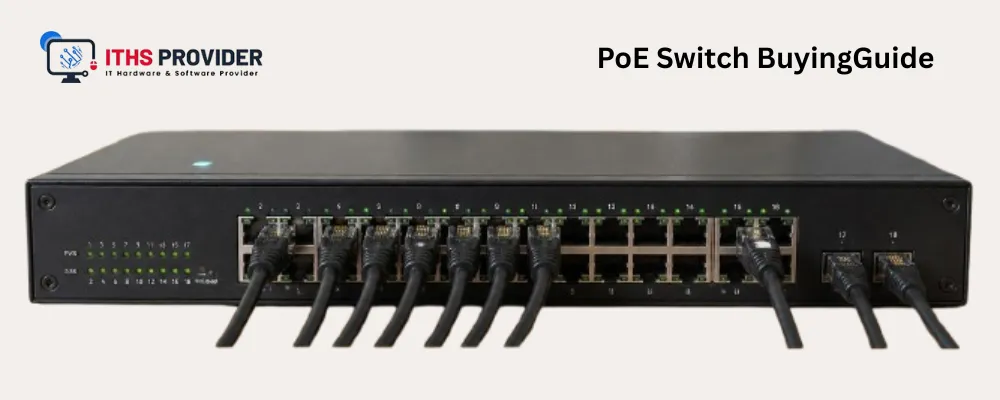
A PoE switch can simplify the installation of cameras, wireless access points, and VoIP phones by carrying power and data through the same Ethernet cable. However, choosing the wrong model can leave your business short of power, ports, bandwidth, or management controls.
The most important specification is not always the number printed in the product name. A practical decision requires comparing the PoE standard, available wattage, port speed, uplink capacity, management features, cabling, warranty, and expected growth.
This guide explains how to choose a PoE switch for a small office, branch location, camera system, wireless network, or larger business infrastructure.
Table of Contents
What Is a PoE Switch?
A PoE switch is an Ethernet switch that sends network data and electrical power through compatible Ethernet cabling. It allows a powered device to operate without a separate electrical outlet at its location.
PoE is commonly used for wireless access points, IP security cameras, VoIP phones, door-access systems, intercoms, sensors, and other compatible network devices.
A PoE switch can also connect standard Ethernet devices that do not require power. In that case, it provides network connectivity without supplying electrical power to the device.
PoE is especially useful when devices are installed on ceilings, walls, poles, doorways, or other locations where installing a separate power outlet would be inconvenient or expensive.
How Does Power over Ethernet Work?
Power over Ethernet sends data and DC power through twisted-pair Ethernet cabling. A compatible switch and powered device identify each other and negotiate the required power before delivery begins.
A typical installation includes the PoE switch, Ethernet cabling, powered devices, network uplinks, and a suitable power source. A UPS may also be used when phones, cameras, access points, or access-control equipment must continue operating during short power interruptions.
The switch’s internal power supply limits the amount of power it can provide. This is why the total power budget matters as much as the number of ports.
Which PoE Standard Should You Choose?
The PoE standard determines how much power the switch can provide and which devices it can support. Compare the switch’s specifications with the maximum power requirement of every connected device.
The power delivered to the device is lower than the switch-side figure because some power is lost through the cable. Use the powered device manufacturer’s maximum requirement when calculating capacity.
Some manufacturers also support proprietary PoE methods. These may work within a specific product family but should not be treated as universally compatible. The IEEE 802.3 standards information provides useful technical context for Ethernet and PoE standards.
How Do You Calculate PoE Wattage?
PoE wattage is the amount of power available for connected devices. To estimate the required capacity, add the maximum wattage of each powered device:
Required PoE Wattage=∑Maximum Device Wattage\text{Required PoE Wattage} = \sum \text{Maximum Device Wattage}Required PoE Wattage=∑Maximum Device Wattage
For example, consider a business that plans to connect eight cameras using 12 W each, six VoIP phones using 7 W each, and four access points using 25 W each:
(8×12)+(6×7)+(4×25)=278 W(8 \times 12) + (6 \times 7) + (4 \times 25) = 278\text{ W}(8×12)+(6×7)+(4×25)=278 W
A 300 W switch may support this configuration on paper, but it leaves little room for expansion or unexpected demand. A higher-capacity model may be a better choice.
Use maximum, not average, power consumption for planning. A camera may draw more power when infrared lighting, heating, audio, or pan-tilt-zoom functions are active. An access point may also require more power when operating at full capacity.
PoE Ports and Total Power Budget
The number of PoE ports tells you how many devices can potentially receive power. It does not tell you whether the switch can power all of them at their maximum requirement.
For example, a 48-port PoE switch may not be able to power 48 high-wattage access points simultaneously. Its total power budget may limit the number of devices that can operate at full capacity.
When comparing models, review the PoE port count, total PoE wattage, maximum power per port, supported standard, and power-supply capacity together.
A switch with fewer ports but a larger power budget may be a better fit for high-power devices than one with more ports and limited wattage. Leave room for expansion rather than designing the installation around the exact number of devices you have today.
How Many PoE Ports Do You Need?
Begin with the devices that require power rather than counting every network connection. Include cameras, access points, phones, access-control equipment, intercoms, sensors, and planned additions.
A small office with a few phones and two access points may need only a compact switch. A building with cameras on several floors may need more ports, a larger power budget, and faster uplinks.
A switch with both PoE and non-PoE ports can be useful when only some devices require power. This can prevent the business from paying for PoE capability on every port.
Managed PoE Switch vs. Unmanaged PoE Switch
What Is a Managed PoE Switch?
A managed PoE switch gives administrators control over traffic, power delivery, and device behavior. Management may be available through a web interface, command line, cloud platform, or network-management system.
Depending on the model, features may include VLANs, Quality of Service, remote port resets, PoE scheduling, port prioritization, access controls, Spanning Tree Protocol, link monitoring, firmware management, and event logging.
A managed PoE switch is generally the better choice when the business needs network segmentation, guest access, remote troubleshooting, security controls, or centralized administration.
For example, cameras may be placed on a separate VLAN from employee computers, while VoIP traffic can be prioritized during busy periods.
What Is an Unmanaged PoE Switch?
An unmanaged PoE switch provides basic network connectivity and power without detailed configuration. It may be suitable for a small, simple installation where all devices can share the same network and remote monitoring is not required.
Its main advantage is straightforward installation. Its limitation is reduced visibility. Troubleshooting a failed camera, overloaded port, or cabling problem can be more difficult without management and monitoring features.
Which Type Is Right for Your Business?
Choose an unmanaged PoE switch for a simple and isolated installation with few devices and limited management requirements.
Choose a managed PoE switch when you need VLANs, monitoring, Quality of Service, access control, remote administration, or power scheduling. Most growing businesses will benefit from the additional control.
What Port Speed and Uplink Speed Should You Choose?
Many PoE switches use Gigabit Ethernet ports, but the correct speed depends on the connected devices and expected traffic.
Gigabit ports may be adequate for standard VoIP phones, basic cameras, desktop computers, older access points, and small offices. Multi-gigabit ports may be more appropriate for newer wireless systems, high-density offices, high-resolution video, or devices that can exceed 1 Gbps.
The uplink connects the PoE switch to another switch, router, firewall, server, or distribution layer. It can become a bottleneck when many cameras or access points send traffic at the same time.
Before purchasing, check whether the model supports the required copper or fiber uplinks, including 1GbE, 2.5GbE, 5GbE, 10GbE, SFP, or SFP+ connections.
For a model-specific example of port, uplink, and PoE specifications, review the manufacturer’s Cisco Catalyst 9300 Series data sheet. Always confirm that the selected model’s specifications match your actual devices and traffic requirements.
A small office may operate comfortably with Gigabit uplinks. A larger wireless or surveillance deployment may need multiple uplinks or a faster connection to the rest of the network.
What Ethernet Cabling Does a PoE Switch Need?
PoE commonly uses twisted-pair Ethernet cabling. Cable category, quality, length, and termination affect both data performance and power delivery.
For a new installation, select cabling that supports the required speed and PoE standard. Existing cabling should be checked for its category, length, physical damage, connector quality, termination, patch-panel condition, heat exposure, and electromagnetic interference.
The usual maximum channel length for standard copper Ethernet installations is approximately 100 meters, including patch cables. Actual performance depends on the cabling, installation, standard, and connected equipment.
Damaged or poorly terminated cabling can increase resistance, generate heat, cause intermittent connections, and reduce available power. If a device repeatedly disconnects or reboots, inspect the cable and power budget before replacing the switch.
What Devices Can a PoE Switch Power?
PoE Security Cameras
A PoE security camera may require basic power or additional wattage for infrared lighting, heaters, microphones, pan-tilt-zoom movement, and other features.
When choosing a PoE switch for cameras, calculate the maximum power requirement of every camera. Also check switching bandwidth and uplink capacity because high-resolution cameras can generate significant traffic.
A managed switch may be useful for separating camera traffic, monitoring ports, scheduling power, and troubleshooting remote devices.
PoE Access Points
A PoE access point may require more power as wireless capacity, radio features, and processing requirements increase.
Check the access point’s required standard and maximum power draw. A high-density wireless installation may also need multi-gigabit access ports and faster uplinks.
If you are installing several access points, calculate both the total power requirement and the expected traffic before selecting the switch.
VoIP Phones and Access-Control Equipment
Many VoIP phones use relatively little power, but models with video screens, touch displays, or expansion modules may require more.
Door controllers, intercoms, card readers, and related systems can also use PoE. Door locks and other auxiliary equipment may require separate electrical power, so confirm the complete system design rather than checking only the network device.
Which Features Improve PoE Reliability?
A PoE switch should be evaluated as part of the complete business network infrastructure.
Power prioritization can help essential devices continue operating when the switch approaches its power limit. Remote port reset allows an administrator to restart a camera, access point, or phone without visiting the site. Temperature monitoring, fan monitoring, event logging, and firmware-management features can simplify maintenance.
Link aggregation can combine multiple physical connections into one logical connection. Network redundancy can reduce the effect of a failed switch, cable, power supply, or network path.
These features may not be necessary for a small office, but they become more valuable when the switch supports surveillance, wireless access, voice communication, or access-control systems.
Should You Buy a New or Refurbished PoE Switch?
A new PoE switch may be preferable when you need current standards, long-term manufacturer support, high energy efficiency, current security features, or a longer planned service life.
A refurbished PoE switch may be suitable when its standard, power budget, port speed, uplink capacity, and management features meet your requirements. It can be a practical option for a branch office, lab, expansion project, or compatible replacement.
Before buying refurbished equipment, verify the exact model, total wattage, per-port output, power-supply condition, firmware availability, product-support status, software licensing, warranty coverage, and included accessories.
If you are also comparing refurbished networking products, review the refurbished networking equipment available from ITHS Provider. This page is a refurbished networking example, so verify the exact product category, condition, specifications, and availability before placing an order.
A low-cost refurbished model is not a good value if it cannot power the connected devices or receive the updates required by the business.
How Do You Choose a PoE Switch for a Small Business?
Start by listing every device that needs power, including cameras, access points, phones, access-control devices, and planned additions.
Then decide whether the business needs managed features. VLANs, guest-network separation, remote troubleshooting, traffic monitoring, and security controls usually justify choosing a managed model.
Next, compare port count, total PoE wattage, port speed, uplink speed, warranty, and expansion capacity.
A simple installation with a few devices may work well with an unmanaged PoE switch. A growing business with multiple departments, network segments, remote locations, or higher security requirements will usually benefit from a managed switch.
Review the network switches available from ITHS Provider when comparing equipment for different business requirements.
What Should You Check Before Buying a PoE Switch?
Confirm the exact model and review the manufacturer’s documentation. Product families can contain several models with different port speeds, power budgets, uplinks, licenses, and management features.
The most important checks are the PoE standard, total wattage, maximum power per port, PoE port count, port speed, uplink speed, switching capacity, management features, operating temperature, power requirements, warranty, and support status.
For refurbished equipment, ask about port testing, power-supply testing, fan condition, firmware, configuration reset, included accessories, and return protection.
If you are comparing Cisco equipment, you can review the Cisco C1000 series switch listing from ITHS Provider, then confirm the exact model specifications and condition before ordering.
PoE Switch Installation and Safety
Install the switch in a clean, ventilated location with appropriate power and rack support. Do not block ventilation openings or place the equipment where heat, moisture, dust, or vibration may affect operation.
Use compatible cabling and label both ends of each cable. This makes future maintenance and troubleshooting easier.
A UPS may be appropriate when cameras, phones, access points, or access-control systems must remain available during short power interruptions. The UPS must be sized for the switch and expected PoE load.
After installation, verify device connectivity, PoE negotiation, power consumption, port speed, uplink status, VLAN assignment, temperature, event logs, and configuration backup.
For organizations replacing older electronics, the EPA electronics recycling guidance provides general information about responsible reuse, donation, and recycling. This is separate from selecting the switch itself, but it can help with responsible disposal of equipment that is no longer needed.
Final Recommendation
The right PoE switch should match the powered devices, data requirements, network design, support expectations, and growth plans.
Start by calculating the required wattage. Then select the appropriate standard, number of PoE ports, port speed, uplink speed, management level, and reliability features.
An unmanaged PoE switch may be sufficient for a small and simple installation. A managed PoE switch is usually the better option when the business needs segmentation, monitoring, remote troubleshooting, Quality of Service, or security controls.
New equipment is generally appropriate for critical, long-term, or high-performance deployments. Refurbished equipment can provide good value when it is professionally tested, compatible with the connected devices, supported by a clear warranty, and suitable for the expected service period.
The best choice is not necessarily the most expensive switch. It is the model that provides sufficient power, bandwidth, control, and support without leaving unnecessary capacity or risk in the design.
Support & Guidance
Frequently Asked Questions
Answers to common questions about PoE switch standards, wattage, ports, management, safety, and business network requirements.
01 What is a PoE switch? ⌄
A PoE switch sends network data and electrical power through compatible Ethernet cabling. It can connect and power cameras, wireless access points, VoIP phones, access-control equipment, and other compatible devices.
02 How do I calculate the PoE wattage I need? ⌄
Add the maximum wattage requirement of every connected powered device and include capacity for future expansion. The total should remain below the switch’s published power budget.
03 Is a managed PoE switch better than an unmanaged PoE switch? ⌄
A managed PoE switch is generally better for networks that need VLANs, monitoring, remote troubleshooting, Quality of Service, scheduling, or security controls. An unmanaged model may be suitable for a small, simple installation.
04 Which PoE standard should I choose? ⌄
Choose a standard that supports the maximum power requirement of your devices. Common standards include IEEE 802.3af, IEEE 802.3at, and IEEE 802.3bt.
05 How many PoE ports do I need? ⌄
You need enough ports for all devices that require power, plus capacity for planned expansion. Confirm that the total power budget can support the connected devices simultaneously.
06 Can a PoE switch connect to a non-PoE device? ⌄
Yes. A standards-compliant PoE switch can generally provide data connectivity to a non-PoE Ethernet device without delivering power to it.
07 Can I use a refurbished PoE switch for business? ⌄
Yes, provided it has the correct standard, sufficient wattage, compatible ports, available firmware, suitable support, and a clear supplier warranty.
08 Do PoE switches need a UPS? ⌄
A UPS is recommended when connected devices must remain available during short power interruptions. The UPS must be sized for the switch and expected PoE load.
09 What uplink speed should a PoE switch have? ⌄
The required speed depends on the number and type of connected devices. Multiple cameras, high-capacity access points, and servers may require multi-gigabit or 10GbE uplinks.
10 Are PoE switches safe? ⌄
PoE switches designed for the applicable standard use device detection and power negotiation. Safe operation also requires compatible equipment, suitable cabling, proper ventilation, and correct installation.
Need Help Choosing the Right PoE Switch?Tell us about your cameras, wireless access points, VoIP phones, PoE wattage, port requirements, and budget. Our team can help you choose the right managed or unmanaged PoE switch for your business network. |
-160x160.webp)
Leave a Reply
Your email address cannot be published. Required fields are marked*


Information
Customer Service
My Account
©2026 ITHS Provider (A Project of Mehta Corp.) - All Rights Reserved.

No comments